
Your entire business team, powered by AI.
AutomatedAgents deploys a dedicated team of AI specialists — sales, marketing, finance, support, and research — that run your operations 24/7. Onboard in days, not months.
💰 One flat monthly price — every AI token, call, and text is included. No usage meters, no surprise bills.
Meet your AI team
Six specialized agents, each an expert in their domain. They coordinate, communicate, and execute — just like a real team.
▼ SCROLL ▼ — watch the team become the logo
The Boss
Coordinates the entire team, enforces guardrails, approves decisions, and keeps everything aligned with your business goals.
Jordan
Handles prospecting, outreach sequences, pipeline management, and discovery calls. Turns leads into closed deals.
Maya
Creates content strategies, manages SEO, writes copy, schedules social campaigns, and builds your brand presence.
Priya
Manages cash flow, invoicing, payroll forecasting, margin analysis, and keeps your financial operations running smoothly.
Sam
Triages tickets, manages SLAs, maintains knowledge bases, handles complaints, and monitors customer satisfaction.
Nadia
Competitive intelligence, lead research, industry trends, vendor evaluation, and market validation.
Text your AI team.
Watch them work.
Every plan ships with a dedicated phone number. Text your team lead — The Boss — and he routes the work to the right specialist, keeps everything on track, and reports back. 24/7.
- ✓ One number, one team lead — The Boss routes work to 6 specialists
- ✓ Built-in approvals — agents never act without your say-so on money or public posts
- ✓ Your own VPS, your own data, flat monthly price
Up and running in days
Self-service onboarding gets your AI team deployed and operational fast.
Sign Up Online
Pick your industry, choose a plan, and pay securely. No sales call needed — our self-serve portal handles everything.
VPS Provisioning
Your dedicated server is automatically created and configured with the Hermes agent framework.
Agent Deployment
Your AI team is deployed with industry-specific SOUL.md files, cron jobs, and integrations pre-configured.
Go Live
Connect your SMS line (Twilio), verify your agents, and start delegating. Your team works 24/7 from day one.
Enterprise-grade automation
Built on the Hermes agent framework with production-ready infrastructure.
200+ Integrations
Connect your existing stack — HubSpot, Stripe, QuickBooks, Slack, Twilio SMS, GitHub, Google Workspace, and more. Your agents work with the tools you already use.
Approval Gates & Guardrails
Every agent operates within your defined constraints. Sensitive actions require human approval. You always have the final say.
Kanban Task Management
Full Kanban boards per agent and a master operations board. Track every task, every workflow, every outcome in real time.
Scheduled Automation
Cron-driven workflows run on your schedule — morning briefings, weekly reports, monthly closes, invoice chasing, and more.
Multi-Channel Communication
Your agents communicate via SMS (Twilio), email, Slack, and more. Get updates where you already work.
133+ Business Skills
Each agent comes pre-loaded with specialized skills — from objection handling to tax prep, SEO audits to competitive intelligence.
Under the hood: how your team actually runs
Every AutomatedAgents team ships with a production coordination layer — not just isolated agents. Here's what's working 24/7 inside your deployment.
Mesh Orchestrator
A synchronous orchestrator ticks every few minutes across the whole team — validating that every agent reported in, checking shared API budgets before firing jobs, and collapsing 10 raw agent outputs into layered summaries your Boss actually reads.
Shared Team Memory (Mnemosyne)
Agents don't live in silos. They write to a shared memory bus with structured handoff schemas — trade ideas, approved orders, risk state, macro signals — so every agent starts a session knowing what the team already decided.
Proving Ground Certification
Every agent gets a job card with a declared permission surface. A certification gate verifies the agent's tools match its job card before the team goes live — stripped terminals, no surprise capabilities, no lateral movement.
broker.py Autonomy Tiers
Each agent has a defined autonomy level. Trivial actions run automatically; irreversible actions — deletes, money movement, public posts — route through approval. You set the tier per agent, and the broker enforces it.
Hard Risk Rules + Kill Switch
Trading teams enforce fixed loss caps, trailing drawdown limits, and concentration limits — and a kill switch halts all new orders the moment a limit breaches. Risk limits are structural, not aspirational.
Tournament & Generate-Filter
Hard decisions run as tournaments — multiple models propose, a judge picks the winner. High-volume pipelines use generate-then-filter: a cheap generator proposes candidates, a frontier filter applies a deterministic rubric. Best output, controlled cost.
SMS-First (Twilio)
Your team is reachable by text message via Twilio — message your Boss or Ops Manager, get briefings and alerts on your SMS line. No app to install, works with the phone you already carry.
Goal-Driven Mode
Teams track a shared goals file — revenue targets, checkpoints, north-star metrics — and every agent's daily brief, weekly review, and escalation ladder is anchored to those goals.
Governance Layer (OMH)
Structured playbooks govern how work flows through the team — request-to-handoff, safe feature changes, weekly ops reviews, incident response. Agents know their evidence boundaries and when to escalate.
See your AI team
Every industry gets a custom agent team with specialized roles, scheduled jobs, and reporting. Here's what each team looks like.
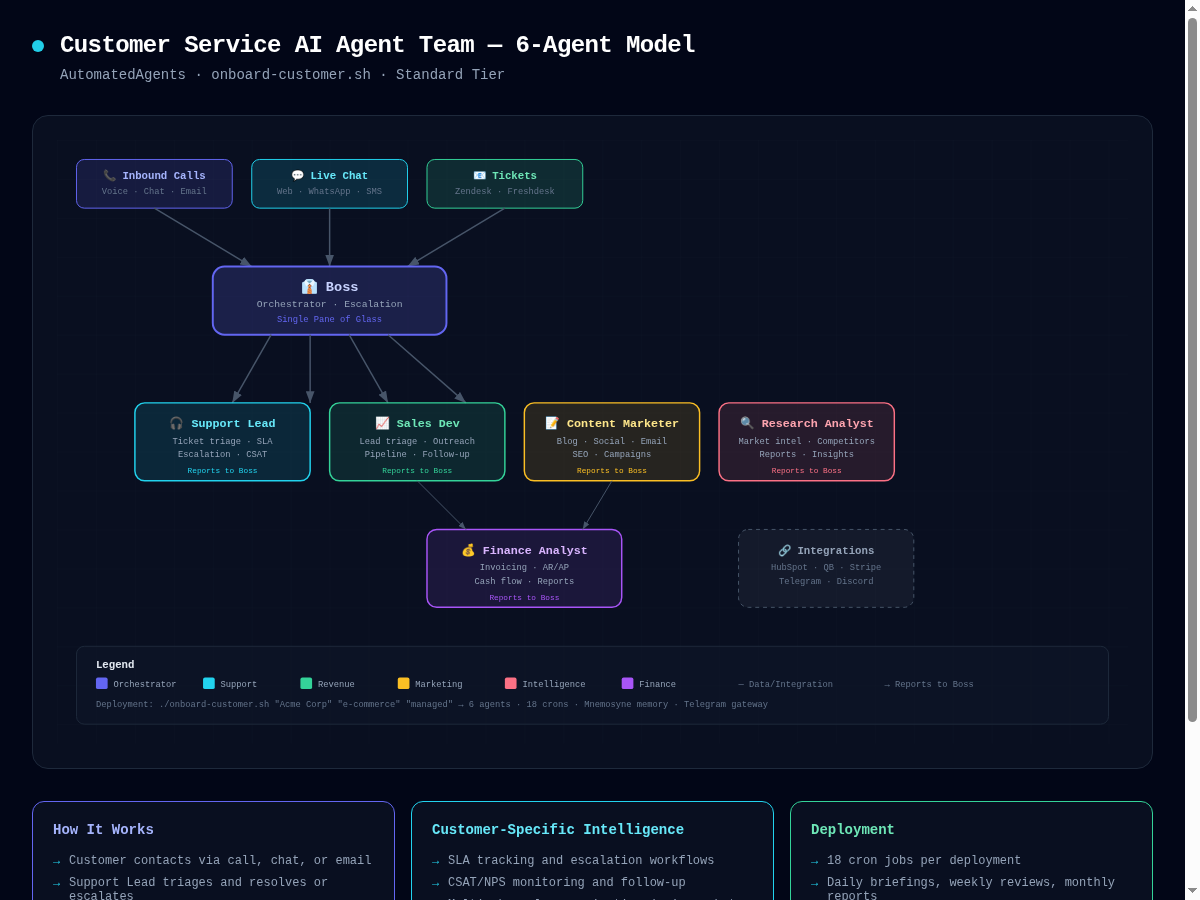
Customer Service Team
6 agents handling sales, marketing, finance, support, and research. 18+ scheduled jobs including daily briefings, lead triage, churn reports, and weekly KPI dashboards.
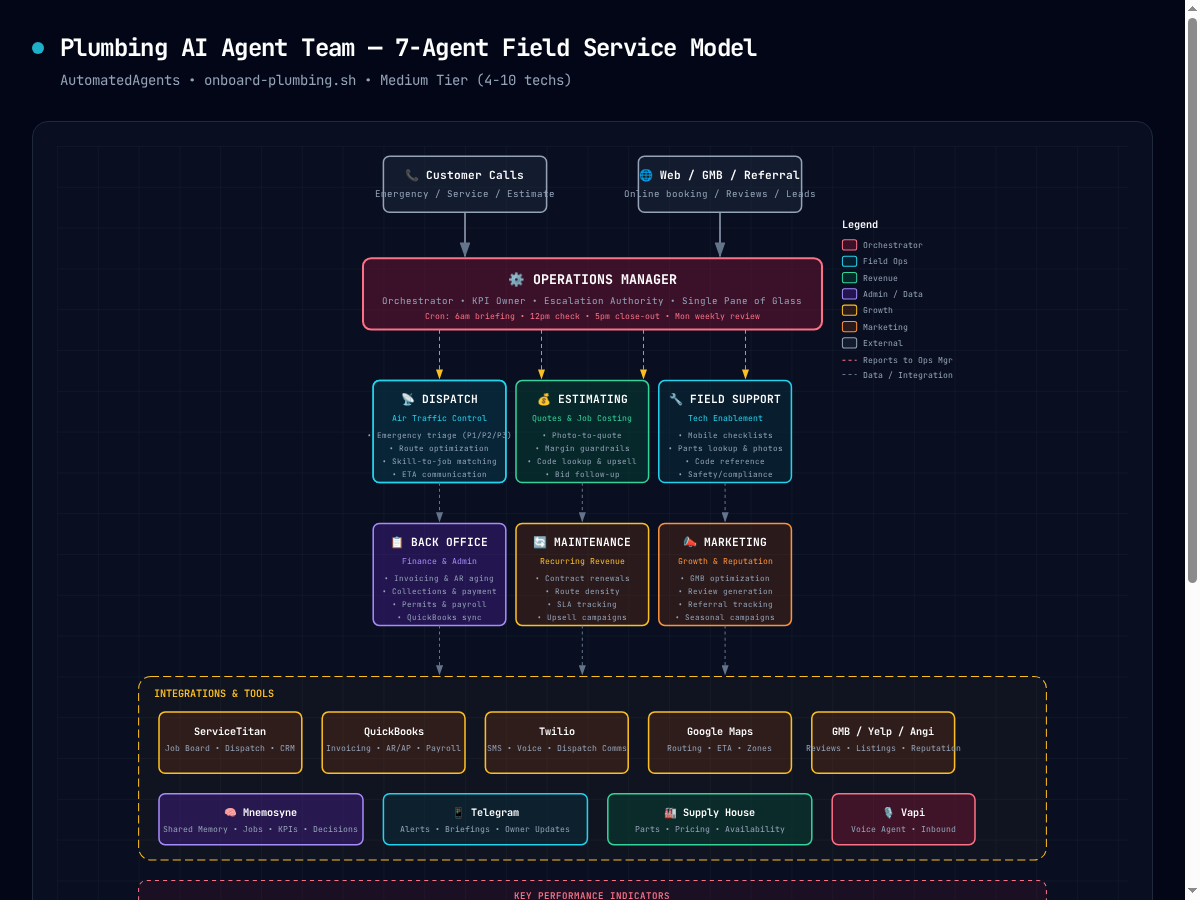
Plumbing Team
10 agents built for field service operations. Ops management, dispatch, estimating, fleet tracking, and technician training — all automated.

HVAC Team
12 agents for HVAC businesses. Seasonal dispatch, maintenance scheduling, parts inventory, fleet management, and customer communication.
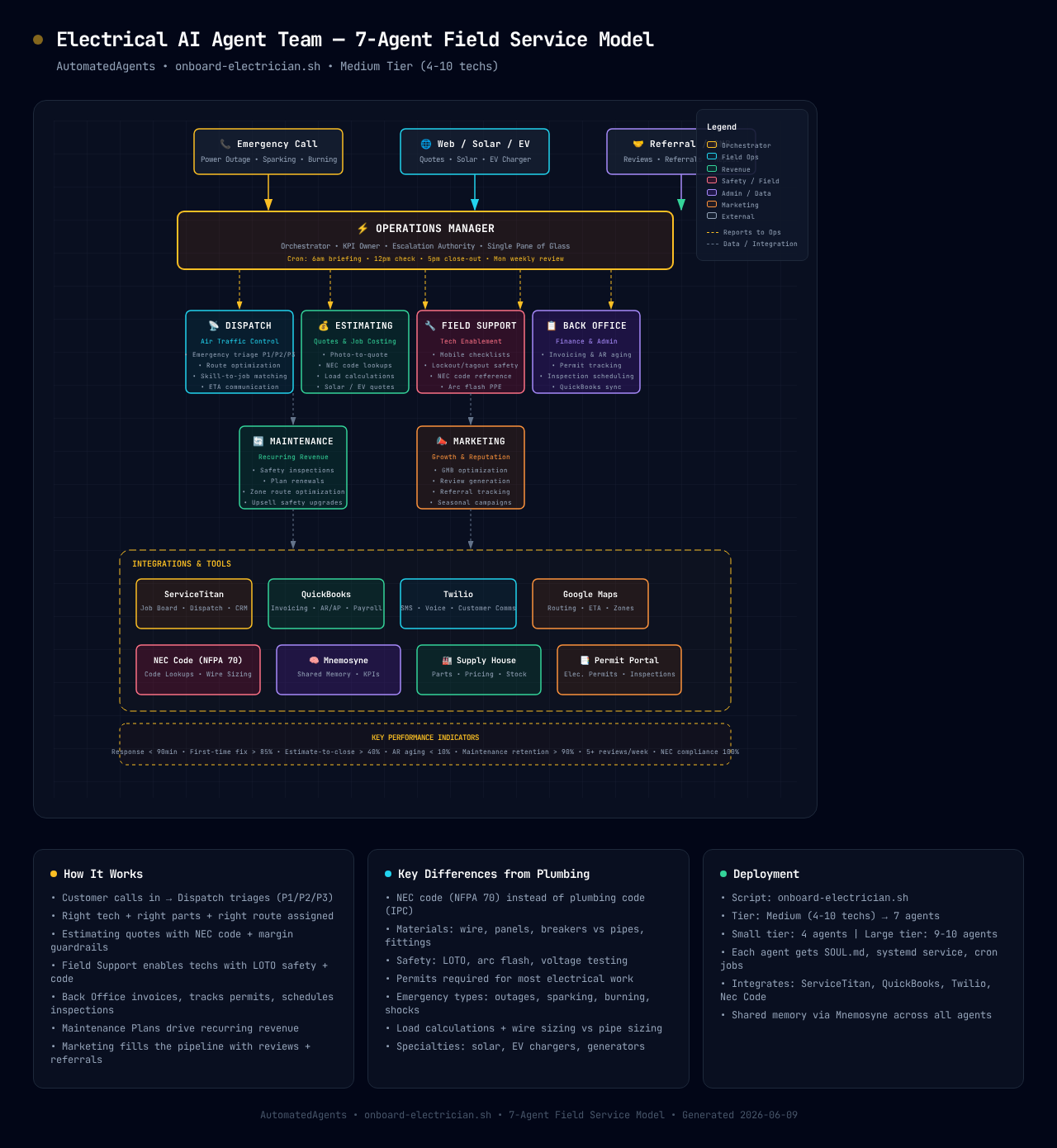
Electrical Team
10 agents for electrical contractors. Permit tracking, NEC compliance, project estimation, crew scheduling, and code compliance monitoring.

Real Estate Team
14 agents for brokerages. Listing, buyer, inside sales, transaction coordination, marketing, client care, commercial, recruiting, investor, regional ops, document processing, and market intelligence — coordinated through one shared memory.

Trading Bull Team
5 agents running one backtested strategy — Donchian 20-day breakout entries and 3x ATR chandelier exits on BTC spot (or BTC + ETH + SOL + BNB).
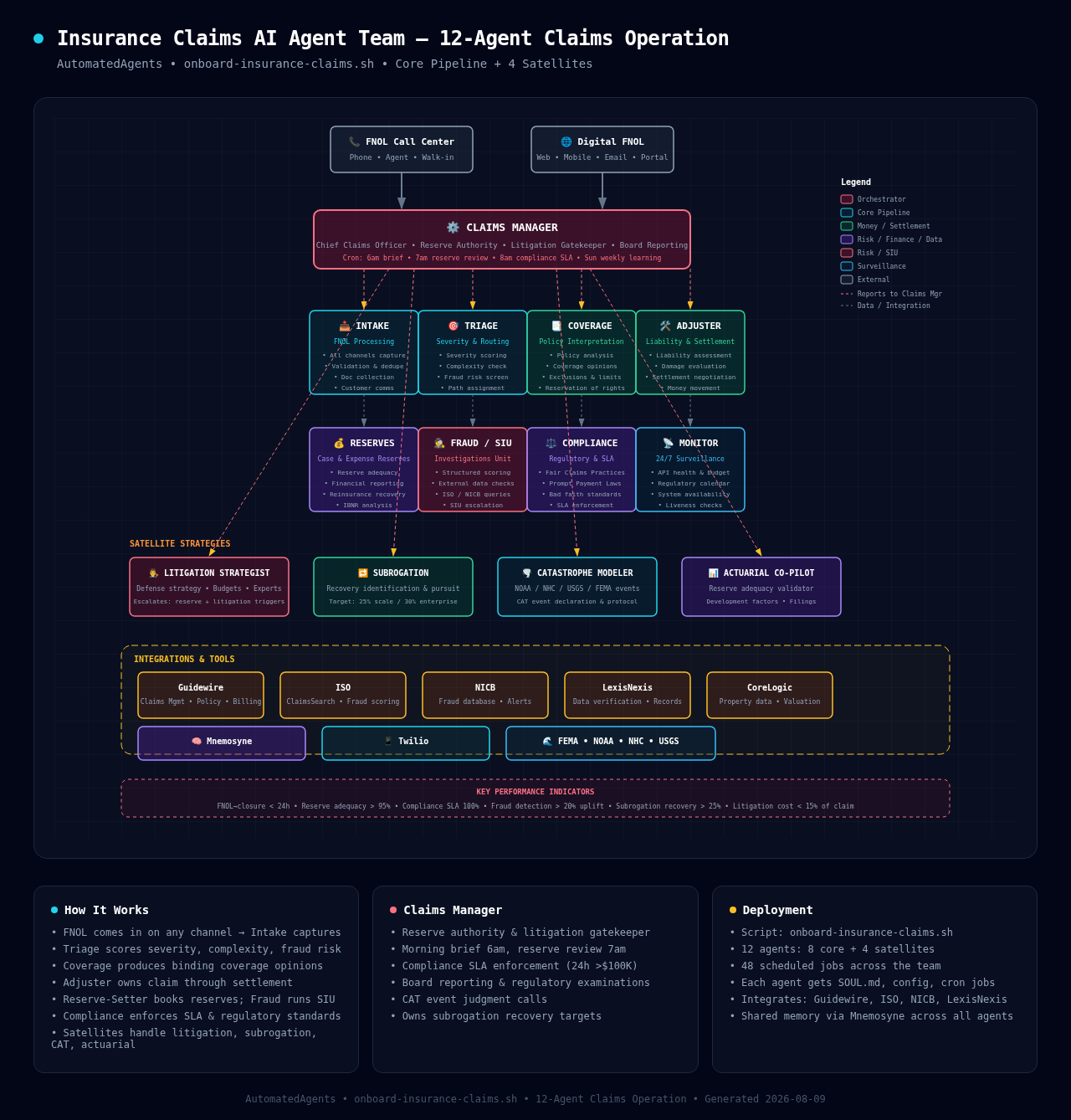
Insurance Claims Team
12 agents for claims operations. FNOL intake, triage, coverage opinions, adjusting, reserves, fraud detection, and regulatory compliance — all automated.
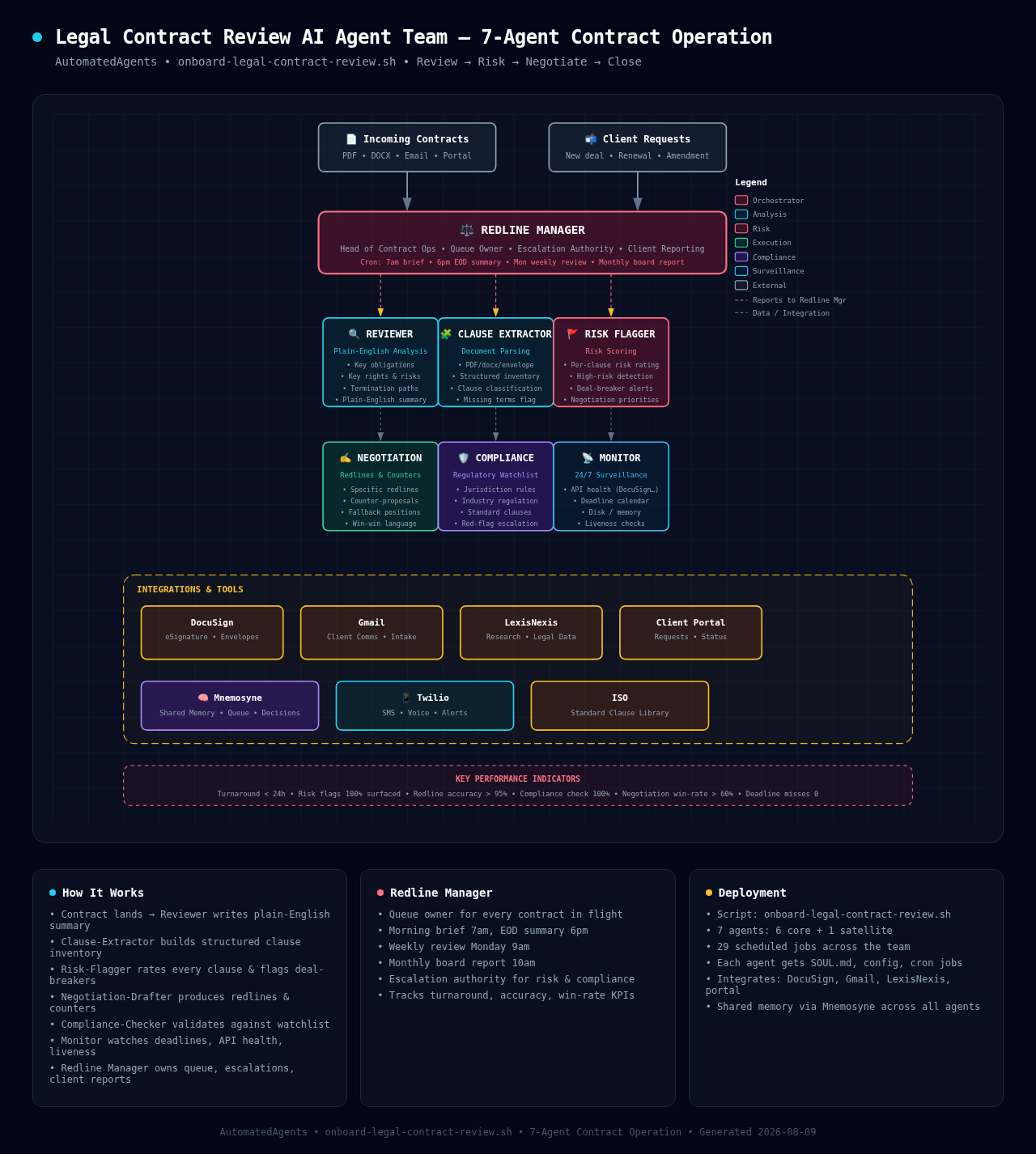
Legal Contract Review Team
7 agents for contract operations. Plain-English review, clause extraction, risk scoring, redlining, and compliance validation — turn contracts around in under 24 hours.

Property Management Team
13 agents for property managers. Leasing, rent collection, maintenance coordination, vendor management, compliance, owner reporting, tenant line, resident relations, and more — run your portfolio 24/7.
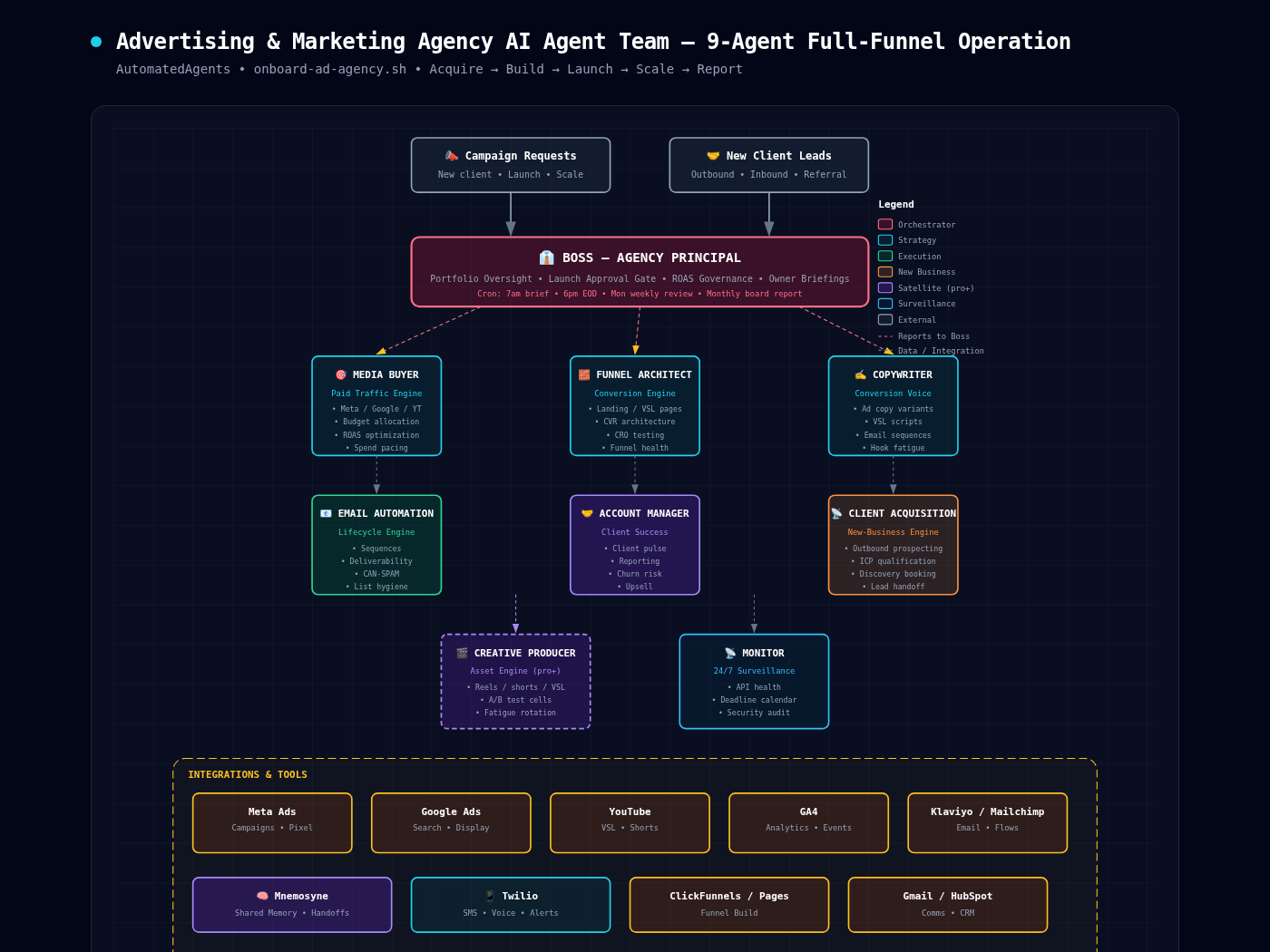
Advertising & Marketing Agency Team
9 agents for ad agencies and marketing firms. Media buying, funnel architecture, copy, email automation, account management, client acquisition, creative production, and 24/7 monitoring — run your full-funnel operation.
Simple, transparent pricing
Choose the plan that fits your business. Scale up anytime.
Getting Started
Perfect for solopreneurs and small businesses getting started with AI automation.
- 3 AI agents (any industry)
- Core business automation
- 5 integrations
- Email support
- Weekly reports
Growth
For growing businesses that need a full AI team handling daily operations.
- Full generic team (6 agents)
- Unlimited tasks
- 20+ integrations
- Priority SMS support
- Daily briefings & weekly reports
- Custom workflows
Industry-Specific
A complete industry-specific AI team — HVAC, real estate, trades, and more.
- Full industry team (4-12 agents)
- Vertical-specific skills & workflows
- Industry compliance built-in
- Dedicated onboarding
- Priority support
- Custom SLA
Trading Bull
Backtested Donchian breakout + chandelier exit strategy, run by a dedicated 5-agent team on BTC — or Multi-Asset (BTC + ETH + SOL + BNB) at $2,500/mo.
- 5-agent trading team
- Donchian 20-day breakout entries
- 3x ATR chandelier exits
- 24/7 market monitoring
- Backtested ~258% ann / −24.2% DD
Enterprise
For agencies, franchises, and businesses with complex multi-team needs.
- Unlimited agents & teams
- White-label deployment
- Dedicated instance
- Dedicated account manager
- SLA guarantee
- On-premise option
Ready to deploy your AI team?
Sign up online and have your AI team running in minutes. Pick your industry, choose a plan, and go live — no sales call needed.